Import motion capture
The Import motion capture dialog imports a posture sequence from an external motion-capture system into Ergoniza Intelligent.
It currently supports MVNX files exported by Xsens systems. These systems record movement with inertial sensors and produce a time-based posture sequence that can be incorporated into the Ergoniza Intelligent biomechanical model.
Open the dialog with MOCAP in the left-side menu. This feature is normally used in Multiple postures mode because importing an MVNX file generates a temporal posture sequence.
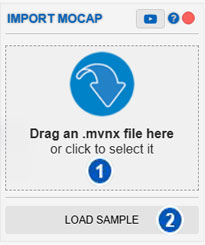
| No. | Area or control | Function |
|---|---|---|
| 1 | Import area | Accepts a dragged MVNX file or opens a file selector when clicked. |
| 2 | Load demo | Loads a demonstration file for testing the import process. |
Purpose of the dialog
Import motion capture adds an activity previously recorded with inertial sensors.
Unlike image, video, or camera capture, the posture is not estimated from an image. It comes from an external motion-capture file containing the temporal information required to reconstruct body posture over time.
Use it when an Xsens capture is available as the basis for Ergoniza Intelligent analyses.
MVNX format
MVNX is an export format used by Xsens systems for motion-capture data.
An MVNX file can contain:
- a frame sequence;
- sampling rate;
- body postures;
- segment orientations or positions;
- anthropometric information estimated or derived from the capture.
Ergoniza Intelligent converts this information into a posture sequence that can be displayed and analyzed.
Import area
Area 1 supports either:
- dragging an MVNX file onto the import area;
- selecting the area and choosing the file from the device.
The system then begins reading and importing the postures in the capture.
Load demo
Load demo, identified by number 2, loads a demonstration file.
Use it to test importing without your own MVNX file and to see how an imported sequence appears and behaves on the timeline.
Import when postures already exist
If postures already exist on the timeline, the system asks how to incorporate the new capture:
- replace the current postures;
- append the imported capture after the existing sequence;
- prepend the imported capture before the existing sequence.
Replace current postures
The current sequence is removed and replaced by the MVNX postures. Use this when you want to work exclusively with the new capture.
Append
Imported postures are placed after the existing ones. This can build a longer activity from several sequences.
Prepend
Imported postures are placed before the current ones. Use this when the new capture represents an initial phase that must precede the existing sequence.
Detected frames and sampling rate
After opening the MVNX file, the system reports the number of detected frames and the capture frame rate.
If the sampling rate is high, the number of imported postures can be very large. The system can reduce the import rate to values such as:
- 15 frames per second;
- 20 frames per second;
- 30 frames per second.
A reduced rate can be useful when:
- the capture is long;
- the file contains too many frames;
- a lighter activity is needed in the system;
- the full temporal resolution is unnecessary;
- sequence handling should be more responsive.
A lower rate reduces the number of imported postures but can lose temporal detail. Select a value appropriate for the task being analyzed.
Import confirmation
After importing, the system reports:
- the number of imported frames;
- the estimated model height in the imported file.
Use this to verify the import and whether the model scale is reasonable. Estimated height matters because it can affect correspondence between the imported capture and the Ergoniza Intelligent biomechanical model.
Import result
The MVNX postures are added to the temporal sequence and can then be reviewed on the timeline. You can:
- play the activity;
- move among postures;
- review keyframes;
- select intervals;
- change sequence duration;
- delete postures;
- generate charts;
- perform biomechanical and postural analyses.
Because import creates a temporal activity, the available analyses are those for Multiple postures mode.
Relationship with the timeline
Each imported frame is positioned in the temporal sequence according to the selected sampling rate. Total activity duration depends on:
- the number of imported frames;
- the original sampling rate;
- any rate reduction selected during import;
- how the sequence was combined with existing postures.
After import, check the timeline for correct duration, position, and activity continuity.
Relationship with multiple-posture analyses
The imported sequence can be used in temporal analyses including:
After changing imported postures, times, or conditions, results and charts may need to be updated.
Review the imported capture
Although the data come from inertial sensors, visually review the imported sequence. Verify that:
- the initial posture is consistent;
- model orientation is correct;
- there are no unexpected jumps or discontinuities;
- model scale is reasonable;
- activity duration is as expected;
- imported postures represent the actual task;
- supports and seated posture are interpreted correctly when relevant.
If a posture requires adjustment, see Manual manipulation of the model posture.
Differences from other capture methods
Ergoniza Intelligent supports:
- Image capture, from a still image.
- Video capture, from a video file.
- Real-time camera capture, from a live camera.
- Import motion capture, from an MVNX file recorded with inertial sensors.
MVNX import does not depend directly on detecting landmarks in an image; it uses sensor-system data. Its quality nevertheless depends on the original capture, sensor calibration, and correspondence between the imported and Ergoniza Intelligent biomechanical models.
Recommended procedure
- Export the Xsens capture in MVNX format.
- Open Import motion capture with MOCAP.
- Drag the file onto the import area or select it.
- If postures exist, decide whether to replace them, append the capture, or prepend it.
- Review the detected frame count and rate.
- Reduce the import rate if the capture is too dense or full temporal resolution is unnecessary.
- Check the imported frame count and estimated height.
- Review the sequence on the timeline.
- Update analyses and charts after any subsequent changes.
Precautions
Before drawing conclusions from the imported capture:
- calibration errors can produce incorrect postures;
- an excessively low rate can omit relevant movements;
- an excessively high rate can create a very heavy sequence;
- estimated height should be consistent with the captured person;
- continuity must be checked when captures are appended or prepended;
- biomechanical results depend on the imported posture being representative.
Related manual sections
- Timeline
- Posture-sequence duration
- Delete postures
- Manual manipulation of the model posture
- Charts
- Exertion
- Postural load
- Lumbar compression
Relationship with the Technical foundations
For methodological details, see:
- Importing data from Xsens
- Adapting MVNX data to the Ergoniza Intelligent model
- Conceptual differences between single-posture and multiple-posture analysis
- Cumulative exertion load in multiple-posture analysis
These sections explain the use of temporal captures from external systems, their integration with multiple-posture analysis, and the precautions required when interpreting results.