Cumulative exertion load
The Cumulative Exertion Load panel is part of Exertion and appears only in Multiple Postures mode.
It is shown only when Consider repetitions and rest periods is enabled under Activity repetitions. If disabled, cumulative biomechanical exertion is not calculated or displayed, although instantaneous results remain available.
Unlike instantaneous results for a particular posture, cumulative load incorporates activity history: posture duration, repeated cycles, rest between repetitions, and partial decay during low-exertion or rest periods.
Cumulative load does not represent remaining capacity and is not used directly to reduce the Recommended Moment. Activity load and, when enabled, the evolution of recommended capacity are calculated separately.
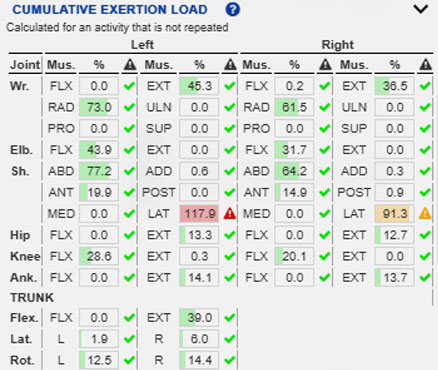
Values can change with epidemiological priority adjustment and its Influence setting.
| Element | Function |
|---|---|
| Joint | Identifies the assessed joint or body region. |
| Mus. | Identifies the muscle group or functional direction of exertion. |
| % | Shows base cumulative load or, with epidemiological adjustment enabled, its weighted value. |
| Graphic indicator | Classifies the value using configured Warning and Risk thresholds. |
| Left and right | Separate results for the two sides of the body. |
| Trunk | Shows trunk flexion, lateral flexion, and rotation results. |
Purpose of the panel
The panel assesses biomechanical demand accumulated during an activity composed of multiple postures.
It is particularly useful when:
- an isolated posture is not critical but repeats many times;
- a joint works during a substantial part of the cycle;
- activity cycles repeat;
- rests are insufficient for complete recovery;
- you need to identify which joints accumulate the greatest load.
Instantaneous exertion and cumulative load
Instantaneous exertion describes biomechanical demand in one posture. Cumulative exertion load describes the accumulated effect of exposure over time.
Moderate exertion held or repeated for a long time may create a high cumulative load, while very high but brief exertion may create a lower cumulative value.
Cumulative load is not the sum or mean of the percentages in the upper panel. The system relates required moment to estimated maximum isometric capacity, combines intensity and duration, and accounts for repetition and partial decay during rest.
This calculation is independent of recommended-capacity updates; a high cumulative value does not produce an equivalent automatic reduction in capacity.
Effect of epidemiological priority adjustment
By default, the epidemiological priority adjustment is enabled. The temporal base calculation is retained and a body-region epidemiological factor is applied to the displayed result.
When enabled:
- the table shows weighted cumulative load;
- graphic indicators use the weighted value;
- cumulative-exertion charts include the weighting;
- model overlays use weighted values;
- reports use the same displayed result.
Influence controls the strength of weighting differences among body regions.
When disabled, the table, charts, model, and reports show base cumulative load. The adjustment does not change posture order, durations, repetitions, rests, or temporal recovery in the base calculation. See Biomechanical analysis settings.
Multiple Postures mode
This panel requires a time sequence and therefore appears only in Multiple Postures mode.
For a single posture, duration and repetition are handled under Action duration and repetitiveness.
For multiple postures, the sequence has a duration and can also include repetition and rest configured under Activity repetitions.
Activity repetitions
Activity Repetitions defines:
- which repetition is analyzed;
- rest between repetitions;
- resulting total duration;
- temporal recovery or decay between exposures.
Text below the panel title summarizes this configuration. Changing repetition or rest can change cumulative values.
If Consider repetitions and rest periods is disabled, previous cycles and intercycle rests are excluded, this panel is hidden, and Cumulative exertion charts cannot be generated.
Table organization
Results are organized by joint, functional muscle group, body side, and trunk.
The table may include directions such as flexion, extension, radial/ulnar deviation, pronation/supination, abduction/adduction, anterior/posterior motion, and medial/lateral rotation.
Its structure resembles Biomechanical exertions, but the result represents accumulation across the activity.
Joint column
Joint identifies the wrist, elbow, shoulder, hip, knee, ankle, or trunk.
Cumulative load is calculated separately for each joint and degree of freedom because temporal exposure differs among regions.
Mus. column
Mus. is a concise functional direction or muscle-group label, not necessarily one isolated anatomical muscle. Abbreviations include:
- FLX: flexion;
- EXT: extension;
- RAD: radial deviation;
- ULN: ulnar deviation;
- PRO: pronation;
- SUP: supination;
- ABD: abduction;
- ADD: adduction;
- ANT: anterior action;
- POST: posterior action;
- MED: medial rotation;
- LAT: lateral rotation;
- L: leftward action or rotation;
- R: rightward action or rotation.
% column
The % column shows cumulative exertion load.
With epidemiological adjustment enabled, it is the base load multiplied by the applicable body-region factor; otherwise it is the unweighted base load.
100% represents the model’s preventive threshold. It is not an exact physiological boundary, direct individual-fatigue measurement, or injury probability.
Interpret the value from exertion intensity, posture duration and frequency, activity repetitions, rest, partial decay, and the active epidemiological settings.
Graphic indicators
Indicators use the Warning and Risk thresholds under Visualization settings, initially 85% and 100%. Changing them affects classification, not cumulative-load values.
- A green check mark is below Warning.
- An orange exclamation mark is at or above Warning but below Risk.
- A red exclamation mark is at or above Risk and should receive priority.
Charts and model display
Sequence charts and model colors use the same values as the table: weighted with epidemiological adjustment enabled and unweighted when disabled.
In Multiple Postures mode, the model display can use either the active instantaneous indicator or cumulative load. Cumulative load represents the state reached by the selected instant and includes previous exposure and decay during lower exertion or rest.
Causes of high results
High cumulative load may result from:
- high instantaneous exertion;
- prolonged posture duration;
- frequent repetition;
- insufficient rest;
- insufficient decay during rest;
- high external loads;
- unfavorable joint posture;
- asymmetric task distribution.
For orange or red results, review both instantaneous posture and the activity’s temporal structure.
Applied loads
Loads on the hands or other body segments can increase required joint exertion and, when sustained or repeated, cumulative load.
Verify:
Posture and movement sequence
Verify that:
- key postures are defined correctly;
- each posture has an appropriate duration;
- interpolation does not introduce unrepresentative movement;
- configured repetitions match the observed task;
- rests are realistic.
See Postural information.
Relationship to other Exertion panels
Interpret cumulative load with:
- Exertion and joint-capacity indicators for the visible posture’s active instantaneous percentage;
- Unprotected population for population interpretation;
- Biomechanical exertions for required moment, functional group, and population capacity;
- Joint loads for mechanical joint forces and moments;
- Support reaction loads for stability and support distribution.
Decay during rest
During periods without exposure or with lower exertion, cumulative load can decrease progressively. It does not immediately return to zero.
Decay depends on rest duration, previous exertion intensity and duration, cycle repetition, and the fast/slow decay settings under Activity repetitions.
These settings control cumulative memory-based results, not the independently calculated recovery of recommended joint capacity.
Interpretation procedure
- Verify Multiple Postures mode.
- Read the repetition/rest summary below the title.
- Check epidemiological adjustment and Influence.
- Review Warning and Risk thresholds.
- Locate red rows, then orange rows.
- Identify the affected joint, functional group, and side.
- Determine whether the result arises from one posture or repeated postures.
- Review applied loads.
- Review repetition and rest settings.
- Compare with Biomechanical Exertions.
- If necessary, change the activity, reduce loads, add recovery, or redesign the task.
Recommendations for use
Use this panel for repetitive or cyclic tasks, sustained postures, frequent moderate exertion, alternating active/rest phases, and any activity where accumulation over time matters.
Do not use it as the sole decision criterion. Interpret it with posture, loads, instantaneous exertion, supports, and actual task context.
When comparing alternatives, keep preventive weighting, Influence, visual thresholds, repetitions, rests, and decay parameters constant.
Do not infer remaining recommended capacity from this value. Review the reference moment and instantaneous indicator under Exertion and joint-capacity indicators and Biomechanical exertions.
Related User Manual sections
- Exertion
- Activity repetitions
- Biomechanical exertions
- Exertion and joint-capacity indicators
- Unprotected population
- Biomechanical analysis settings
- Visualization settings
- Load or force on the hands
- Loads on body segments
- Postural information
Relationship to the Technical foundations
For further methodological detail, see:
- Cumulative exertion load in multiple-posture analysis
- Cumulative exertion-load concept
- Instantaneous relative exertion
- Obtaining the exposure time limit from MET curves
- Temporal integration of dose and cumulative-load update
- Partial recovery between exertions
- Repeated tasks and rest between repetitions
- Temporal exertion-dose calculation
- Final result and ergonomic interpretation
- 3CC-r model and Recommended Moment
- Limitations of multiple-posture analysis, the 3CC-r model, and cumulative exertion load
These sections explain calculation from exertion intensity and duration, decay during rest, preventive weighting of the displayed result, and its difference from recommended-capacity evolution.