Delete postures
The Delete postures dialog removes one or more postures from a Multiple postures activity.
Open it from the timeline with the delete-postures button. It removes keyframes that no longer represent the activity correctly or simplifies or reorganizes the animation.
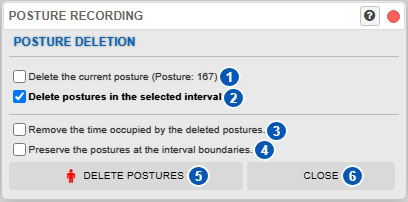
| No. | Control or area | Function |
|---|---|---|
| 1 | Delete current posture | Deletes the posture at the current time—that is, the posture under the timeline cursor. |
| 2 | Delete postures in the selected interval | Deletes all postures within the timeline interval selection. |
| 3 | Also delete the time during which the postures were sustained | Specifies whether the corresponding time interval is removed together with the postures. |
| 4 | Keep postures at interval boundaries | When interval duration is retained, keeps the postures at the boundaries of the selection. |
| 5 | Delete postures | Applies the selected deletion. |
| 6 | Close | Closes the dialog without making changes. |
Purpose of the dialog
Multiple-posture activities consist of keyframes placed at different times. You may need to delete a posture because it:
- was entered by mistake;
- no longer represents the task correctly;
- is unnecessary in a simplified sequence;
- belongs to a portion to be replaced;
- lies within an interval that must be removed.
This dialog performs the operation in a controlled way.
Delete the current posture
Option 1 deletes the current posture, which is the posture at the time under the timeline cursor.
When this option is active, selecting Delete postures removes that specific keyframe without affecting the rest of the sequence.
Delete postures in the selected interval
Option 2 deletes all postures in the selected timeline interval.
It is available only when a time interval has first been selected on the timeline. Use it to remove a complete activity phase rather than one isolated posture.
Also delete the interval time
Option 3 determines whether the time during which the postures were sustained is also removed.
When disabled
- the postures are deleted;
- the total sequence duration remains unchanged.
The time interval continues to exist, although its postures are removed. The system recalculates that portion using the remaining postures and interpolation.
When enabled
- the postures are deleted;
- the corresponding time interval is also deleted.
The complete sequence becomes shorter. This operation trims the activity rather than only deleting its keyframes.
After using it, also review Posture-sequence duration.
Keep postures at interval boundaries
Option 4 is available only when Also delete the time during which the postures were sustained is disabled.
It keeps postures at the start and end boundaries of the selected interval while deleting interior postures.
This means:
- the time interval continues to exist;
- intermediate postures can be removed;
- postures at the selected boundaries remain.
Effect of keeping the boundaries
Keeping boundary postures preserves a defined entry and exit for the selected interval. Internal interpolation is recalculated between these limits, generally producing a more controlled change.
If the boundary postures were also deleted, the interval could depend on postures outside the selection and its transition could change more substantially.
When to use this option
Use it to:
- simplify part of a sequence;
- remove redundant intermediate postures;
- preserve the movement structure at the start and end of the interval;
- keep the interval’s temporal boundaries without shortening the activity.
Delete postures button
Delete postures, identified by number 5, applies the selected operation and recalculates the resulting sequence.
The operation can change:
- existing keyframes;
- interpolation between postures;
- total sequence duration, if time was also deleted;
- temporal activity conditions;
- associated results and charts.
After deletion, review the animation and update analyses if necessary.
Close button
Close, identified by number 6, closes the dialog without deleting a posture.
Relationship with interpolation
Deleting postures directly affects interpolation between keyframes.
When interpolation is enabled, the system generates intermediate postures between key postures. Removing one or more postures changes the references used for those transitions.
After deletion:
- intermediate movements can change;
- movement continuity can change;
- the activity’s visual and biomechanical results can change.
Play the sequence afterward to confirm that the animation still represents the real task.
Relationship with the timeline
This dialog depends on the timeline:
- the current posture is determined by the temporal cursor;
- the posture interval depends on the timeline selection;
- sequence duration can change when time is also deleted;
- the visible keyframes change after deletion.
Before deleting, carefully review:
- the selected posture;
- the selected interval;
- whether to retain interval duration;
- whether to keep the interval boundaries.
Relationship with manual posture editing
Before deleting a posture, consider whether it would be better to modify it.
See:
Relationship with sequence duration
When Also delete the time during which the postures were sustained is enabled, the activity becomes shorter. This affects the total duration and temporal distribution of remaining postures.
See Posture-sequence duration.
Relationship with analyses and charts
Deleting postures can change temporal results, particularly:
Update results and charts after the sequence changes.
Recommended procedure
- Decide whether to delete the current posture or a complete interval.
- Carefully review the timeline selection.
- Decide whether to retain the time associated with the deleted postures.
- Decide whether to keep the interval-boundary postures.
- Apply the deletion.
- Play the activity again.
- Verify that interpolation still represents the movement correctly.
- Update analyses and charts if necessary.
Related manual sections
- Timeline
- Posture-sequence duration
- Manual manipulation of the model posture
- Activity repetitions
- Charts
- New chart
- Activity-condition charts
Relationship with the Technical foundations
For general information about temporal handling, see:
- Conceptual differences between single-posture and multiple-posture analysis
- Cumulative exertion load in multiple-posture analysis
- Temporal integration of dose and cumulative-load update
- Repetitive tasks and rest between repetitions
These sections explain how temporal sequence changes can affect subsequent analyses.