14.4 Importing data from Xsens
Ergoniza Intelligent can import movement data acquired with inertial motion-capture systems such as Xsens MVN. Xsens MVN records human movement in three dimensions and is used in fields including ergonomics, biomechanical research, sports medicine, film, video games, and animation. It uses a network of inertial sensors placed on the body that contain accelerometers, gyroscopes, and magnetometers to measure linear acceleration, angular velocity, and the magnetic field, respectively. The system can capture movement in real time and transmit the data to a computer for subsequent analysis or processing.
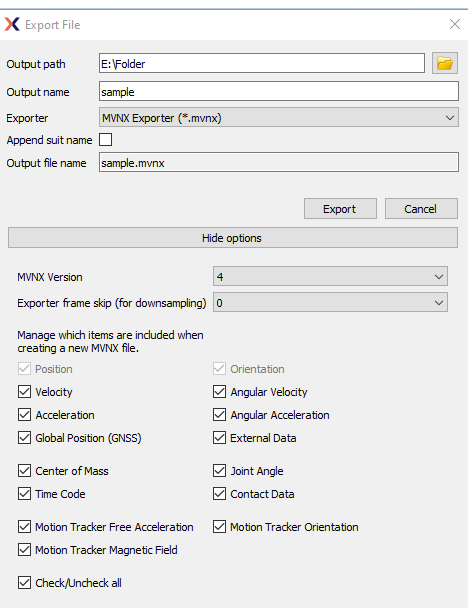
Figure 71: Xsens MVN dialog box with options for exporting to MVNX format
Xsens MVN systems can export acquired user-movement data in MVNX (MVN Open XML) format, which can be imported by Ergoniza Intelligent. MVNX files from version 3 through the version current at the date of this document can be imported. Figure 71 shows the Xsens MVN dialog box with options for exporting to MVNX format. Of the dynamic data options shown in Figure 71, Ergoniza Intelligent requires Position and Orientation data. The importer also reads the segment definitions and required timing information, including the time of each frame and the sampling rate.
After the file to be imported is selected, Ergoniza Intelligent reads its original sampling rate. When the file contains more than 100 frames and its rate is higher than 30 frames per second, the program prompts the user to reduce it to 15, 20, or 30 fps (Figure 72). The user can choose a value below 30 fps if the device running Ergoniza Intelligent does not have sufficient capacity to display postures at an adequate speed. When selecting this value, it should be considered that the sampling rate can affect the accuracy with which body-segment accelerations are estimated. Sampling rates below 12 frames per second may underestimate peak accelerations by 22%, whereas rates above 100 provide little improvement in estimating the acceleration profile81F1.

Figure 72: MVNX file import options dialog box.
From the positions and orientations of the different body segments in MVNX files, Ergoniza Intelligent reconstructs the model's postures over time and calculates the user's estimated stature and the lengths of the different body segments. The user's weight is not imported and must therefore be entered manually.

Figure 73: MVNX file import summary dialog box.
The import result is presented to the Ergoniza Intelligent user in a dialog box such as the one shown in Figure 73.
S. Kromodihardjo and A. Mital, “The Cost/Accuracy Approach: A Method for Selecting Filming Rate for Manual Materials Handling Activities,” Applied Ergonomics 17, no. 3 (1986): 218–20, doi:10.1016/0003-6870(86)90011-6.↩︎