Load-lifting analysis results
The Load Lifting window displays lifting and manual-handling analysis results.
It is available in Lifting mode. Before reviewing results, define lifting tasks, temporal organization, task-specific parameters, and origin/destination postures. The window shows the overall temporal result, task results, and origin/destination details.
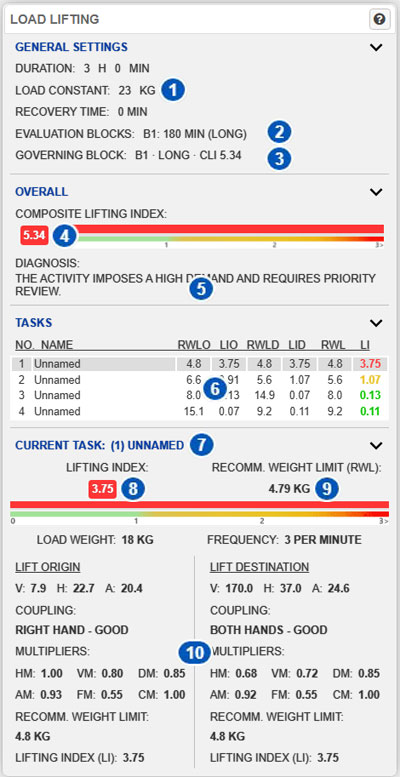
| No. | Area or result | Function |
|---|---|---|
| 1 | General-settings summary | Shows total lifting time, Load Constant, and total recovery time. |
| 2 | Evaluation blocks | Shows how lifting periods are grouped according to duration and recovery between them. |
| 3 | Governing block | Identifies the block producing the least favorable overall result, its duration category, and LI or CLI. |
| 4 | Overall Lifting Index | Shows the LI or CLI for the governing block. |
| 5 | Overall diagnosis | Interprets the overall result. |
| 6 | Task table | Summarizes all defined lifting tasks. |
| 7 | Current task | Identifies the selected task. |
| 8 | Task Lifting Index | Shows the selected task’s LI in the governing block. |
| 9 | Task Recommended Weight Limit | Shows the selected task’s RWL in the governing block. |
| 10 | Origin and destination details | Shows geometry, coupling, multipliers, RWL, and LI at both endpoints. |
Purpose of the window
The analysis uses the Revised NIOSH Lifting Equation (RNLE) to estimate a Recommended Weight Limit (RWL) and compare it with the actual load to obtain a Lifting Index (LI).
Ergoniza Intelligent supports:
- one lifting task;
- multiple tasks in one activity;
- different origin and destination conditions;
- different frequencies, weights, coupling, or geometry;
- one or more lifting periods separated by recovery.
The window links the overall result to its temporal organization and individual tasks.
General-settings summary
Area 1 shows:
- Duration: accumulated lifting time across all defined periods;
- Load Constant: reference value used by the equation;
- Recovery time: sum of recoveries between lifting periods.
Duration and recovery must not be interpreted separately. Their chronological distribution determines whether periods are evaluated independently or grouped.
Evaluation blocks
Area 2 shows the evaluation blocks created from temporal organization.
A block may contain one lifting period or several periods that must be evaluated together because recovery between them is insufficient. Each block shows its number, effective lifting duration, and short, moderate, or long duration category.
Every block is calculated and compared. Their indices are not added or averaged to obtain the overall result.
Governing block
Area 3 identifies the governing block: the block with the least favorable LI or CLI, which establishes the overall result.
Other blocks are not ignored; retain them to interpret duration, repetition, and context. If several blocks share the same maximum result, all are governing blocks.
If an evaluation block or total elapsed sequence duration exceeds eight hours, the temporal organization is outside the RNLE’s supported limits. A valid governing block and overall result cannot then be calculated.
Overall Lifting Index
Area 4 shows the overall LI or CLI for the governing block.
Conceptually:
Lifting Index = Load weight / Recommended Weight Limit
A lower index means the handled load is below the RWL; increasing values indicate increasing task demand.
A single-task analysis shows Lifting Index (LI). A multitask analysis shows the Composite Lifting Index (CLI). The displayed overall value belongs to the governing block and may differ from other temporal blocks.
Interpreting LI and CLI
- LI or CLI ≤ 1: the activity is within the recommended limit.
- 1 < LI or CLI < 3: the activity exceeds the recommended limit and requires review.
- LI or CLI ≥ 3, or INF: high demand requiring priority review.
These levels support prioritization; they do not predict injury or identify specific affected individuals.
A high index can result from excessive weight, distance from the body, unfavorable height, large vertical travel, twisting, poor coupling, or high frequency.
Overall diagnosis
Area 5 translates the index into a direct interpretation. Treat it as decision support and review which tasks and multipliers contribute most to an unfavorable result.
Task table
Area 6 summarizes all tasks, including:
- task number and name;
- RWLO: Recommended Weight Limit at origin;
- LIO: Lifting Index at origin;
- RWLD: Recommended Weight Limit at destination;
- LID: Lifting Index at destination;
- RWL: overall task Recommended Weight Limit;
- LI: task Lifting Index.
Selecting a row updates Current task below.
Recommended Weight Limit
RWL is the load weight that should not be exceeded under the specific task conditions.
Conceptually:
RWL = LC × HM × VM × DM × AM × FM × CM
where:
- LC is the Load Constant;
- HM is the Horizontal Multiplier;
- VM is the Vertical Multiplier;
- DM is the Distance Multiplier;
- AM is the Asymmetry Multiplier;
- FM is the Frequency Multiplier;
- CM is the Coupling Multiplier.
With anthropometric adjustment enabled, some factors may also reflect model anthropometry.
RWL at origin and destination
Origin and destination may have different geometry and coupling, so the system calculates RWLO/LIO and RWLD/LID.
When significant control is required at the destination, the task uses the more restrictive endpoint. Otherwise, the task result is determined from the origin, while destination values remain visible for review.
Current task
Area 7 identifies the selected task and shows its detailed results. This is especially important in multitask analyses.
Task Lifting Index
Area 8 shows the selected task’s LI in the governing block.
LI compares actual load weight with task RWL. A value at or below 1 is within the recommended limit; above 1, the actual load exceeds it.
In a multitask activity, high-LI tasks can contribute strongly to the overall index. Review the highest task values first.
Task Recommended Weight Limit
Area 9 shows the selected task’s RWL in the governing block.
It indicates the maximum recommended weight for the task’s conditions. If actual weight exceeds it, LI is greater than 1. Use this result to estimate the needed load reduction or condition improvement.
Origin and destination details
Area 10 separates the two endpoints and shows:
- V: vertical location;
- H: horizontal location;
- A: asymmetry angle;
- hand or coupling type;
- coupling quality;
- multipliers;
- RWL;
These values explain the calculated result.
Vertical location
Vertical location is the load height above the floor at the origin or destination. Very low or very high positions generally reduce RWL. Its multiplier is VM.
Horizontal location
Horizontal location is the distance from the body. Greater distance increases lumbar moment and reduces RWL. Its multiplier is HM.
Keep the load as close to the body as practical.
Asymmetry angle
The asymmetry angle describes rotation or deviation from the worker’s sagittal plane. Twisted or laterally displaced handling reduces RWL. Its multiplier is AM.
For high asymmetry, consider rearranging the workstation, load position, or sequence to avoid trunk rotation.
Vertical travel distance
The height difference between origin and destination affects DM. Greater vertical travel can increase task demand. Interpret the complete path even though endpoint values are displayed separately.
Frequency
Frequency is the number of lifts per minute. Higher frequency reduces RWL, particularly over longer lifting periods. Its multiplier is FM.
Set task frequency under Lifting task settings, and lifting periods and recovery under General lifting settings.
Coupling quality
Coupling quality affects CM. Good coupling provides better control; fair or poor coupling reduces RWL.
Origin and destination coupling are configured separately. Destination coupling contributes to the task result when significant control at destination is enabled.
Multipliers
Each multiplier reduces the Load Constant when actual conditions differ from ideal:
| Factor | Meaning | Penalized condition |
|---|---|---|
| HM | Horizontal Multiplier | Load far from the body. |
| VM | Vertical Multiplier | Load height far from the favorable zone. |
| DM | Distance Multiplier | Large vertical travel. |
| AM | Asymmetry Multiplier | Twisted or asymmetric handling. |
| FM | Frequency Multiplier | High lifting frequency or duration. |
| CM | Coupling Multiplier | Fair or poor coupling. |
Values near 1 represent more favorable conditions. Inspecting the multipliers identifies what is reducing RWL.
Individual-task result
A task’s RWL and LI depend on:
- actual load weight;
- lifting frequency;
- duration category of the evaluated block;
- horizontal and vertical locations;
- vertical travel;
- asymmetry;
- coupling quality;
- significant destination control;
- origin and, when applicable, destination conditions;
- anthropometric adjustment.
For high LI, consider reducing weight or frequency, moving the load closer, changing heights, avoiding rotation, or improving coupling.
Overall multitask result
For multiple tasks, the window shows a Composite Lifting Index (CLI) for each evaluation block. The least favorable block CLI becomes the overall result.
Review:
- overall CLI;
- each task’s results;
- each task frequency;
- evaluation blocks and the governing block.
A task can contribute substantially even when its individual LI is not the highest, so review every task.
INF means that at least one task condition produces a zero RWL and therefore a nonfinite index.
If temporal organization is reported as unsupported, review block duration and total elapsed sequence time, including recovery. Ergoniza Intelligent does not provide an RNLE result when either limit exceeds eight hours.
Diagnosis and redesign
For an unfavorable diagnosis, inspect the factors reducing RWL. Typical interventions include:
- reducing load weight;
- moving the load closer to the body;
- raising a very low origin;
- lowering an excessively high destination;
- eliminating trunk rotation;
- improving coupling;
- reducing lifting frequency;
- adding recovery;
- dividing the task or using mechanical assistance.
Relationship to task settings
If a result appears inconsistent, review under Lifting task settings:
- load weight;
- frequency;
- hand or hands used;
- origin and destination coupling quality;
- significant control at destination;
- task name and selection.
Relationship to general settings
Also review under General lifting settings:
- temporal organization;
- period durations and number;
- recovery between periods;
- resulting evaluation blocks;
- Load Constant;
- anthropometric adjustment.
Changing them can change RWL and LI.
Relationship to origin and destination postures
Set endpoint postures from the Load-lifting task bar using Origin and Dest.
Verify hand/load position, load height, horizontal location, asymmetry, and that origin and destination are not reversed. Use Manual manipulation of the model posture when needed.
Interpretation procedure
- Check total lifting duration and entered recovery.
- Review the evaluation blocks.
- Identify the governing block.
- Review the overall LI or CLI and diagnosis.
- Use the task table to locate high-index tasks.
- Select the least favorable task.
- Review its LI and RWL.
- Compare origin and destination, accounting for significant destination control.
- Inspect the multipliers.
- Review task settings and temporal organization before redesign.
Related User Manual sections
- Operating modes
- Load-lifting task bar
- General lifting settings
- Lifting task settings
- Manual manipulation of the model posture
- Model settings
- Lifting report
Relationship to the Technical foundations
For more detailed lifting methodology, see Section 13 of the Technical foundations:
- Load-lifting analysis
- Definition of lifting tasks, general parameters, and anthropometric adjustment
- Origin and destination positions
- Analysis results: Recommended Weight Limit, Lifting Index, and Composite Lifting Index
These sections explain RWL, LI, multipliers, endpoint differences, and single- and multitask interpretation.