Posture-sequence duration
The Posture-sequence duration dialog changes the total duration of an activity in Multiple postures mode.
Open it from the timeline using the posture-sequence duration button. Its purpose is to adjust the total duration over which the recorded postures are distributed.
You may need this setting to match an observed activity duration, extend the available time for adding postures, or shorten the sequence to remove unnecessary portions.
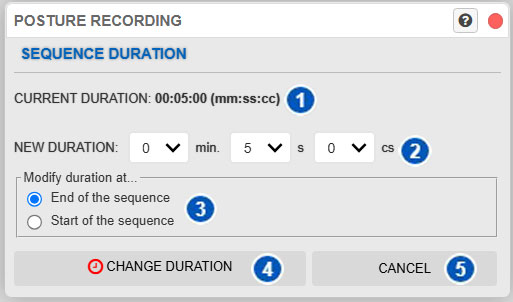
| No. | Control or area | Function |
|---|---|---|
| 1 | Current duration | Displays the current posture-sequence duration. |
| 2 | New duration | Sets the new total sequence duration. |
| 3 | Change start or end | Specifies whether the duration change is applied at the beginning or end of the sequence. |
| 4 | Change duration | Applies the new duration. |
| 5 | Cancel | Closes the dialog without applying changes. |
Purpose of the dialog
A posture sequence has a total duration. This duration defines the available timeline interval and determines the temporal positions of recorded postures.
The Posture-sequence duration dialog changes that total without requiring you to recreate the complete activity.
This setting affects the activity sequence and can therefore influence:
- temporal distribution of postures;
- animation playback;
- interval selection on the timeline;
- time-dependent analyses;
- temporal charts;
- repetition, rest, and accumulation calculations in multiple-posture activities.
Current duration
Value 1 displays the current sequence duration in time format.
Use it as a reference for the existing total duration before making changes.
New duration
Area 2 sets the new total duration of the sequence.
Duration is defined in separate fields for:
- minutes;
- seconds;
- hundredths of a second.
Enter the new total to assign to the activity. The timeline adjusts to reflect the new sequence length.
Change the start or end of the sequence
Option 3 determines where in the sequence the change is applied.
There are two choices:
- End of the sequence.
- Beginning of the sequence.
Change the end of the sequence
With this option:
- increasing duration extends the available final portion;
- decreasing duration trims the end of the sequence.
This is usually the most natural option for extending or shortening the end of an existing activity.
Change the beginning of the sequence
With this option:
- increasing duration extends the initial portion of the sequence;
- decreasing duration trims the beginning.
This can be useful for shifting the activity’s content in time or removing an initial portion that should not be retained.
Caution when reducing duration
Take particular care when reducing sequence duration.
A reduction can cause previously entered postures to be lost, especially when they lie in the portion to be trimmed.
Before applying a reduction:
- use the timeline to review the postures at the beginning and end of the activity;
- check whether any posture will fall outside the new interval;
- consider moving those postures first or preserving them by other means.
Once removed by temporal trimming, those postures may no longer be available in the sequence.
Change duration
Change duration, identified by number 4, applies the entered duration.
The system updates the total posture-sequence length according to:
- the new duration;
- the selected application area—the beginning or end.
After applying the change, review the timeline and play the activity to confirm that the result is as intended.
Cancel
Cancel, identified by number 5, closes the dialog without making changes.
Use it to exit while leaving the current sequence duration unchanged.
When duration may need to be changed
This dialog is useful when:
- the observed activity lasts longer than initially recorded;
- the sequence must be extended to add new postures;
- an irrelevant initial or final portion must be removed;
- duration must be matched to a real work cycle;
- the activity must be prepared for more representative temporal analyses or charts.
Relationship with the timeline
The total sequence duration determines the extent of the timeline.
Any change made here directly affects:
- activity length;
- temporal positions of keyframes;
- animation playback;
- selection of time intervals.
After changing duration, review the activity on the timeline to confirm that its temporal distribution remains consistent.
Relationship with posture editing
When the sequence duration changes, you may also need to review the positions of its key postures.
For information about entering or changing postures within the sequence, see:
Relationship with temporal analyses
Changing sequence duration can affect time-dependent results, particularly in multiple-posture activities.
This can influence:
If duration changes after analyses or charts were generated, update them.
Recommendations for use
Before applying a duration change:
- review the current activity duration;
- decide whether the change should be applied at the beginning or end;
- determine whether a reduction can remove existing postures;
- apply the change;
- review the timeline;
- play the activity to verify the result;
- update analyses and charts if necessary.
Related manual sections
For further information, see:
Relationship with the Technical foundations
For a fuller explanation of temporal handling in multiple-posture activities, see:
- Conceptual differences between single-posture and multiple-posture analysis
- Cumulative exertion load in multiple-posture analysis
- Repetitive tasks and rest between repetitions
These sections explain why total sequence duration is relevant to posture-sequence analysis.