Exertion
The Exertion window contains the main biomechanical results for the assessed posture or activity: joint exertions, the relationship between required exertion and its reference, potentially unprotected population, cumulative exertion load, joint loads, and support reaction loads.
The displayed percentage depends on Biomechanical analysis settings. By default, Calculate max. recommended exertion (%) is enabled and the system displays Percentage of Maximum Recommended Exertion (%MRE), incorporating weighting intended to prioritize body regions with higher musculoskeletal-disorder prevalence.
If disabled for a single posture, it displays % recommended joint capacity.
In Multiple Postures mode, Include cumulative exertion load in recommended exertion (%) determines whether recommended capacity is updated from exertion and recovery. When enabled, % recommended joint capacity is shown; when disabled, Percentage of Maximum Isometric Capacity Used is shown. Titles and labels identify the active indicator.
See Activity repetitions and 3CC-r model and Recommended Moment.
Open the window with Exertion on the left menu.
Single Posture mode reports the current posture and loads. Multiple Postures mode can also include time evolution, cycle repetition, and accumulated exertion.
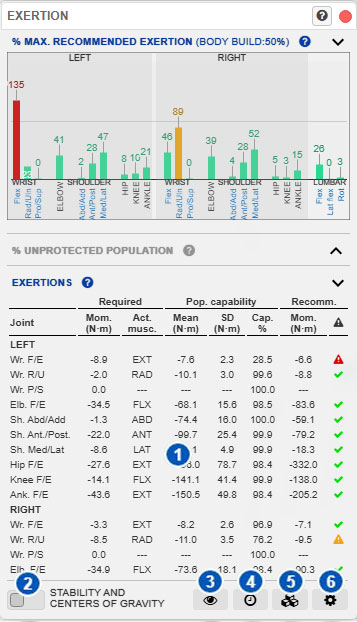
The figure shows default %MRE behavior.
| No. | Area or control | Function |
|---|---|---|
| 1 | Biomechanical result panels | Displays the active exertion/capacity indicator, unprotected population, biomechanical exertions, cumulative load, joint loads, and support reaction loads. |
| 2 | Stability and centers of gravity | Opens the Stabilogram for supports, weight distribution, stability, and centers of gravity. |
| 3 | Show exertion on model | Displays biomechanical results from the active panel or analysis mode on the model. |
| 4 | Times and activity cycles | Opens action duration/repetitiveness for one posture or activity repetitions for multiple postures. |
| 5 | Sustained load or force | Opens the hand load/force window. |
| 6 | Biomechanical analysis settings | Opens settings specific to the biomechanical analysis. |
Purpose of the window
This window combines results derived from model posture, applied loads, and the selected analysis conditions. It helps identify:
- which joints have the greatest exertion;
- the active exertion/capacity percentage and its reference;
- the population that may not be protected;
- mechanical joint loads;
- support reactions;
- effects of external loads and activity duration.
Results are model-based estimates. Verify that posture, loads, duration, and supports represent the actual task.
Biomechanical result panels
Area 1 contains expandable result panels.
Exertion or joint-capacity indicator
The displayed percentage depends on Biomechanical Analysis Settings:
- default: Percentage of Maximum Recommended Exertion (%MRE);
- Single Posture without %MRE: % recommended joint capacity;
- Multiple Postures without %MRE but with previous exertion included: % recommended joint capacity, updated through exertion and recovery;
- Multiple Postures without either option: Percentage of Maximum Isometric Capacity Used.
See Exertion and joint-capacity indicators.
Unprotected population percentage
% unprotected population estimates the proportion of the reference population that may not be protected against the required exertion. It is a population interpretation, not a description of one person.
Exertions
Exertions provides required moment, acting functional group, mean maximum capacity, standard deviation, Protected Population Percentage, reference moment, and graphic status.
The reference changes with the active indicator: the %MRE preventive-priority limit, recommended joint capacity, or maximum isometric capacity.
Cumulative exertion load
This panel appears in Multiple Postures mode when Consider repetitions and rest periods is enabled.
It combines exertion intensity and duration, cycle repetition, and partial decay during lower activity or rest. With %MRE enabled, displayed values include preventive-priority weighting.
Do not confuse it with recommended-capacity evolution. The cumulative-load number is not directly used to calculate capacity; both calculations use the time sequence independently.
Disabling repetition/rest hides this panel and cumulative-exertion charts and also prevents recommended capacity from being updated from previous activity. Instantaneous results remain.
Joint loads
Joint loads shows mechanical loads calculated at model joints from posture, body weight, external loads, and equilibrium conditions.
See Joint loads.
Support reaction loads
Support reaction loads shows calculated reactions at feet, knees, hips, or other detected supports according to posture and seated condition.
Stability and centers of gravity
Control 2 opens the Stabilogram, which shows the support base, weight distribution, detected support type, centers of gravity, and possible slipping.
Show exertion on the model
Control 3 displays biomechanical results on the model.
In Single Posture mode, it can display %MRE, % recommended joint capacity, or unprotected population. In Multiple Postures mode it can display the active instantaneous indicator or cumulative exertion load.
Colors use Warning and Risk thresholds from Visualization settings, initially 85% and 100%. Changing thresholds affects visual classification, not calculated values.
Use this display to locate affected joints spatially, but confirm results numerically.
Times and activity cycles
Control 4 opens:
- Action duration and repetitiveness in Single Posture mode;
- Activity repetitions in Multiple Postures mode.
Some results depend on time, repetition, and recovery, not only instantaneous posture. Verify that these settings represent the real task.
Sustained load or force
Control 5 opens Load or force on the hands. For other body regions, see Loads on body segments.
Verify load magnitude and direction before interpreting results.
Biomechanical analysis settings
Control 6 opens Biomechanical analysis settings.
Calculate max. recommended exertion (%) controls preventive-priority weighting and Influence controls its strength. In Multiple Postures mode, Include cumulative exertion load in recommended exertion (%) controls whether previous exertion and rest change recommended capacity.
The window also selects NIOSH-recommended or custom capable-population limits for Unprotected Population.
These settings change presentation and interpretation, not model posture or applied loads.
General interpretation
Always read the panel title to identify the active reference.
A high %MRE means required moment approaches or exceeds the preventive-priority limit. A high % recommended joint capacity means it approaches or exceeds recommended capacity for the analyzed conditions. Percentage of Maximum Isometric Capacity Used compares it directly with estimated maximum isometric capacity without prior-activity updates.
These percentages are not injury probabilities. Results may reflect:
- unfavorable joint posture;
- high external load;
- asymmetric weight distribution;
- unstable support;
- relevant duration or repetition;
- previous exertion and rest, when included;
- model anthropometry and biomechanics;
- for %MRE, body-region prevalence and Influence.
For an unexpected result, review posture, angles, loads, seated condition, stability, timing, active indicator, analysis settings, and visual thresholds.
Single versus Multiple Postures
In Single Posture mode, action duration and repetitiveness determine recommended capacity.
In Multiple Postures mode, posture order and duration can produce two separate time-dependent results:
- cumulative exertion load, summarizing demand throughout the activity;
- recommended-capacity evolution, estimating reduction during exertion and recovery during rest.
They use the same time sequence but are calculated separately. Disabling Consider repetitions and rest periods removes both temporal calculations while leaving instantaneous results. %MRE weighting is applied independently.
The same posture can therefore produce different results in isolation and after previous exertion and rest.
More help for Exertion
- Exertion and joint-capacity indicators
- Unprotected population
- Biomechanical exertions
- Cumulative exertion load
- Joint loads
- Support reaction loads
- Biomechanical analysis settings
Related User Manual sections
- Postural information
- Load or force on the hands
- Loads on body segments
- Seated posture
- Stabilogram
- Action duration and repetitiveness
- Activity repetitions
Relationship to the Technical foundations
For further methodological detail, see:
- Overexertion risk analysis
- Maximum joint capacities
- Exertion assessment
- Percentage of Maximum Recommended Exertion
- Recommended maximum voluntary contraction percentage in single-posture analysis
- Instantaneous relative exertion
- 3CC-r model and Recommended Moment
- Cumulative exertion load in multiple-posture analysis
- Cumulative exertion-load concept
- Temporal integration of dose and cumulative-load update
- Joint-load calculation
- Joint loads
- Stabilogram and support-reaction distribution
- Conceptual differences between single- and multiple-posture analysis
These sections explain biomechanical analysis, exertion/capacity indicators, joint loads, temporal accumulation, and the relationship among stability, supports, and mechanical load.