Lifting report
The Lifting report documents the configuration and results of a load-lifting assessment. It supports single-task and multitask analyses and can include temporal organization, general data, each task’s conditions, origin and destination postures, and NIOSH results for the determining block or blocks.
To prepare it, select Lifting mode and open the Report Generator with REPORT.
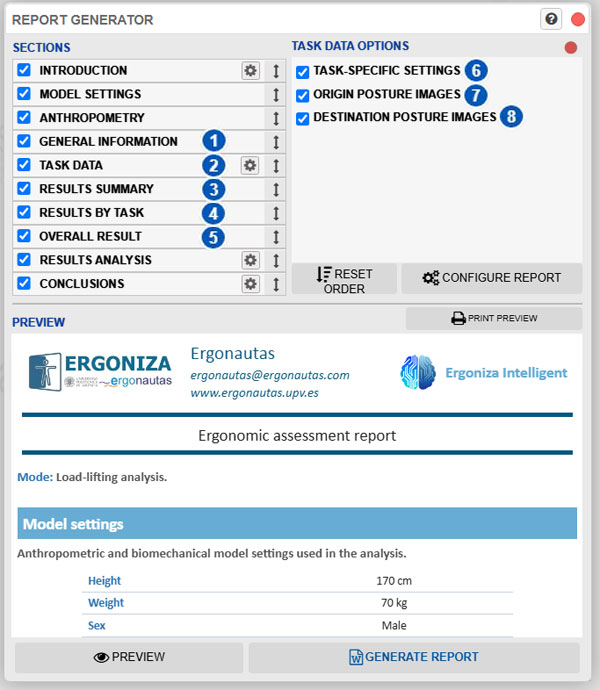
| No. | Section or option | Function |
|---|---|---|
| 1 | General information | Includes general characteristics, temporal organization, assessment blocks, and the list of tasks assessed. |
| 2 | Task data | Describes the specific conditions of each task and can include its origin and destination postures. |
| 3 | Results summary | Presents a comparative table of the main results for all tasks in the determining block. |
| 4 | Results by task | Provides the origin and destination parameters, factors, and results for each task in the determining block. |
| 5 | Overall result | Includes the LI or CLI establishing the determining block’s overall result. |
| 6 | Task-specific settings | Includes frequency, load, handling, coupling quality, and significant control at the destination for each task. |
| 7 | Origin-posture images | Includes a capture of each task’s origin posture. |
| 8 | Destination-posture images | Includes a capture of each task’s destination posture. |
General controls for selecting, ordering, configuring, and generating the report are explained under Report generation.
Report sections
Lifting mode replaces the postural and biomechanical sections with five specific sections, identified by numbers 1 through 5. It also retains the common sections:
- Introduction.
- Model settings.
- Anthropometry.
- Results analysis.
- Conclusions.
All sections are initially enabled and can be excluded or reordered in the same way as in other reports.
General information
Section 1 describes the scope of the lifting analysis. It can include:
- analysis type: single-task or multitask;
- number of tasks;
- temporal organization: one period, regular pattern, or custom sequence;
- indication that all periods share the same task and frequency profile;
- number of periods;
- total lifting time;
- total recovery time;
- total elapsed duration of the lifting-period sequence;
- period and recovery configuration;
- assessment blocks, their periods, lifting time, duration category, and resulting index;
- determining block or blocks;
- load constant;
- anthropometric adjustment;
- numbered list of included tasks.
For a regular pattern, the report gives the period duration, number of repetitions, and recovery between periods. For a custom sequence, it presents each period in order with its duration, subsequent recovery, and assessment block.
This section identifies the common conditions and temporal organization used to calculate the results. To change them, see General lifting settings.
Task data
Task data, identified by number 2, presents each task separately. Its options determine the included information.
Task-specific settings
Option 6 can include:
- lifting frequency;
- load weight;
- whether significant control is required at the destination;
- hand or hands used at the origin;
- coupling quality at the origin;
- hand or hands used at the destination;
- coupling quality at the destination.
These values come from each task’s current configuration. See Lifting-task settings.
Origin and destination images
Options 7 and 8 are independent. You can include only origin postures, only destination postures, or both.
When generating the preview, Ergoniza Intelligent moves through the tasks and captures the requested postures. The model’s initial state is restored afterward. Images always appear in origin-then-destination order.
Capturing images for several tasks can increase preview-generation time. If a requested posture is unavailable, the report states that it could not be obtained without preventing inclusion of other available data.
Results summary
Section 3 provides a table for comparing tasks. For each task, it can display:
- RWL and Lifting Index at the origin;
- RWL and Lifting Index at the destination;
- limiting RWL;
- task Lifting Index;
- result assessment.
RWL is the Recommended Weight Limit and LI is the Lifting Index. The assessment states whether the result is within the recommended limit, requires review, or has high demand requiring priority review. Values correspond to the determining block and quickly locate the least favorable tasks and endpoints.
Results by task
Section 4 provides each task’s detailed results. For the origin and destination it can include:
- vertical location;
- horizontal distance;
- asymmetry angle;
- handling method and coupling quality;
- horizontal, vertical, distance, asymmetry, frequency, and coupling multipliers;
- the one-handed handling multiplier;
- Recommended Weight Limit;
- Lifting Index and assessment.
After the origin and destination results, the report identifies the evaluated endpoint and presents the task’s determining result for the determining block.
When significant control is required at the destination, the task result uses the less favorable condition between origin and destination. Otherwise, the result is determined from the origin, although destination data remain available to describe and review the movement.
See Load-lifting analysis results for parameter meanings and interpretation.
Overall result
Section 5 displays the overall result for the determining block.
For a single-task analysis, the overall result uses the determining block’s Lifting Index (LI) and matches the single task’s determining result. For a multitask analysis, it presents the determining block’s Composite Lifting Index (CLI), its assessment, and—when available—the tasks contributing most to the combined result. If the index is INF, the report identifies it as requiring priority review.
All assessment blocks are calculated and compared. The block producing the least favorable LI or CLI establishes the overall result. Results for other blocks are retained for review but are neither added nor averaged. If several blocks reach the same maximum, all are identified as determining blocks.
Review the overall result together with temporal organization, the summary, and task details. An unfavorable result can be dominated by one task or by the combination of several tasks.
The temporal organization cannot be assessed with the Revised NIOSH Lifting Equation when a block accumulates more than eight hours of lifting or when the sequence’s total elapsed duration—lifting plus recovery—exceeds eight hours. The report then retains available temporal information but states that no determining block or valid overall NIOSH result can be established.
Results analysis and conclusions
Results analysis brings together the main lifting findings. Its options can show all results, risks and warnings, or risks only. The text identifies the determining block or blocks and relates them to the overall LI or CLI.
Conclusions can be written manually, obtained from a template, or transferred from Ergo-Wizard. See Introduction and conclusions. In Lifting mode, conclusions generated from NIOSH results identify the determining block or blocks. If temporal organization cannot be assessed, they state that a determining block cannot be established rather than presenting an invalid overall result. Ergo-Wizard does not display criterion or body-region filters in this mode.
Recommended procedure
- Define temporal organization and the other general lifting settings.
- Create and configure all required tasks.
- Check origin and destination postures and calculated results.
- Review periods, recovery times, assessment blocks, and determining block or blocks.
- Confirm that neither any block nor the sequence’s total elapsed duration exceeds the accepted temporal limits.
- Open the Report Generator.
- Enable the sections to include.
- Open Task data options and select the required settings and images.
- Generate the preview and wait for requested captures to finish.
- Confirm that the intended temporal organization and tasks appear and that the report is identified as a load-lifting analysis.
- Review assessment blocks, summary, individual results, and overall result.
- Print the preview or generate the final document.
If tasks, postures, settings, or results change after the preview is prepared, update it before generating the report.
Related foundations
For calculation details, see Load-lifting analysis in the Technical foundations.