Postural information
The Postural information dialog displays the model’s postural angles in the current posture. It provides a numerical reading of body position so that you can review, verify, or document the represented posture.
This dialog is informational; it does not itself change the model posture. The displayed values update from the current postural configuration and can be viewed using different angular references.
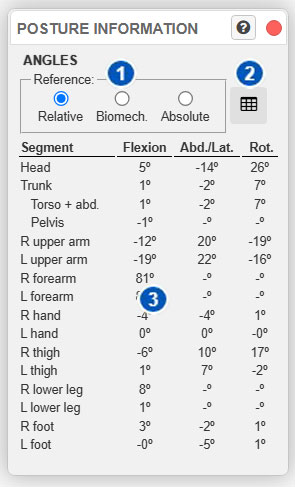
| No. | Control | Function |
|---|---|---|
| 1 | Angular-reference selector | Selects how angles are calculated and presented: relative, biomechanical, or absolute reference. |
| 2 | Export to CSV | Exports the displayed angle table in CSV format. |
| 3 | Postural-angle panel | Displays angular values for the model’s main body segments. |
Angular reference
The Reference selector, identified by number 1, selects how postural angles are calculated and presented.
There are three options:
- Relative;
- Biomechanical;
- Absolute.
Selecting a different reference does not change the model posture. It only changes the criterion used to express angles in the table.
Relative reference
Relative displays angles between connected body segments.
Each segment is interpreted relative to the body segment on which it depends. For example, an upper arm’s position is expressed relative to the trunk, a forearm’s position relative to the upper arm, and a leg’s position relative to the pelvis or corresponding body segment.
This reference is useful for reviewing how the body is articulated because it shows the angular relationship between adjacent segments. It is therefore appropriate for checking posture from the perspective of the joints between segments.
Use it when you need to determine:
- how much a joint is flexed relative to the preceding segment;
- a segment’s relative position with respect to the segment to which it is connected;
- whether the model posture is consistent from an articular perspective.
Biomechanical reference
Biomechanical displays angles according to the reference used in the system’s biomechanical analyses.
Do not interpret this reference simply as a direct geometric reading of the model. Values follow conventions adapted to biomechanical analysis so that they are more consistent with the internal calculations used by certain assessments.
For some segments, the biomechanical reference can reorganize or interpret angles differently from the relative or absolute reference. It is therefore the most appropriate option for reviewing angular information in terms closely related to the system’s analyses.
Use it to check angular values related to:
- biomechanical analyses;
- exertion assessment;
- functional interpretation of the posture;
- results that depend on internal biomechanical conventions.
If you want to understand why a biomechanical analysis returns a particular result, this reference is usually more useful than a purely relative or absolute reference.
Absolute reference
Absolute displays angles relative to the model’s local reference system.
Each segment’s orientation is expressed with respect to the model’s or scene’s system, rather than only the immediately preceding body segment. This can be useful for determining a segment’s general spatial orientation.
This reference is especially useful for reviewing how a segment is oriented in the scene—for example, to check a segment’s overall inclination or its orientation relative to the complete model.
Use it when you want to assess:
- the spatial orientation of a body segment;
- a segment’s position relative to the model’s general system;
- the difference between a joint’s relative posture and the segment’s global orientation.
Postural-angle table
Panel 3 displays the postural-angle table.
The table contains the model’s main body segments and their angular values. Columns use simplified terminology:
- Flexion;
- Abd./Lat.;
- Rot.
These terms are used generically for all segments to simplify the presentation. Strictly speaking, the specific anatomical meaning can vary with the segment. For example, the second column can represent abduction, adduction, or lateral flexion depending on the body segment; the third represents the corresponding rotation.
The table should therefore be interpreted as an operational, condensed reading of the posture rather than an exhaustive anatomical description of every joint.
For some body segments, a value may not apply or have practical meaning under a particular reference. In these cases, the system can display a dash or leave an angular component blank.
Export the table
Button 2 exports the angle table in CSV format.
The export contains the values visible in the angle panel. Before exporting, select the angular reference you want to retain:
- export with Relative for angles between connected segments;
- export with Biomechanical for values consistent with the analysis references;
- export with Absolute for segment orientations relative to the model system.
The CSV file can be used for documentation, external review, posture comparison, or subsequent analysis in a spreadsheet.
Differences between the three references
The same posture can produce different values under each reference. This does not mean that the posture changed; it is being measured using different criteria.
| Reference | What it expresses | Recommended use |
|---|---|---|
| Relative | Angles between connected body segments. | Articular review of the posture and verification of relationships between adjacent segments. |
| Biomechanical | Angles according to the conventions used by the system’s biomechanical analyses. | Interpretation of biomechanical results and review of values relevant to calculations. |
| Absolute | Segment orientation relative to the model’s local reference system. | Review of the general spatial orientation of body segments in the scene. |
Recommendations for use
Use this dialog to review the posture before running or interpreting an analysis.
As a general rule:
- Use Relative to check relationships between connected segments.
- Use Biomechanical to compare angular information with biomechanical analyses.
- Use Absolute to review the spatial orientation of segments.
- Export the table only after selecting the appropriate angular reference.
- Visually inspect the model together with the numerical values; the table does not replace inspection of the complete posture.
If an angular result is unexpected, first verify that the model posture is correct and that you selected the appropriate angular reference. A mistaken interpretation can result from viewing the posture under a reference other than the one required for the analysis.