Biomechanical analysis settings
The Biomechanical Analysis Settings window configures three aspects of the analysis:
- whether to apply the weighting used to calculate Percentage of Maximum Recommended Exertion;
- in Multiple Postures mode, whether previous exertion and recovery change the recommended capacity;
- the capable-population limits used to interpret the protected or unprotected population percentage.
Open it with the gear button at the bottom of the Exertion window. Changes affect indicators, tables, charts, reports, and model overlays, but do not change the posture or entered loads.
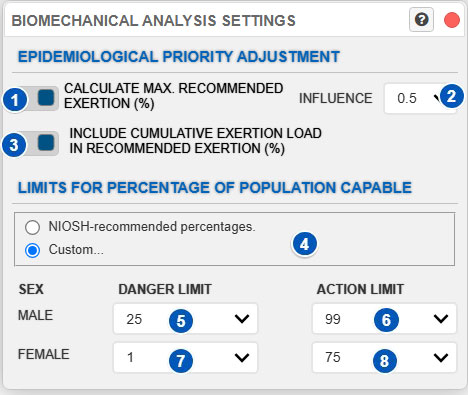
The figure shows Multiple Postures mode. Control 3 is not shown for a single posture because recommended capacity is calculated from the duration and repetition configured for that action.
| No. | Control | Function |
|---|---|---|
| 1 | Calculate max. recommended exertion (%) | Turns preventive-priority weighting on or off. When enabled, %MRE is shown. When disabled, the percentage name and reference depend on the operating mode and control 3. |
| 2 | Influence | Sets how strongly differences in prevalence among body regions affect epidemiological weighting. |
| 3 | Include cumulative exertion load in recommended exertion (%) | Determines whether previous exertion and recovery update recommended capacity in Multiple Postures mode. Enabled by default. |
| 4 | Limit type | Selects NIOSH-recommended percentages or custom limits. |
| 5 | Danger limit for males | Sets the percentage of capable males associated with the danger limit. |
| 6 | Action limit for males | Sets the percentage of capable males associated with the action limit. |
| 7 | Danger limit for females | Sets the percentage of capable females associated with the danger limit. |
| 8 | Action limit for females | Sets the percentage of capable females associated with the action limit. |
Purpose of the window
The biomechanical analysis compares required exertion with different capacities or reference limits. These settings determine how that comparison is presented and how population results are interpreted.
The first group controls %MRE and the importance assigned to differences among body regions. The second, available in Multiple Postures mode, determines whether previous exertion and recovery change recommended capacity. The third sets the capable-population percentages used as action and danger limits.
These settings may affect:
- the displayed exertion or capacity indicator;
- the reference moment;
- the evolution of recommended capacity during an activity;
- cumulative load shown with or without preventive weighting;
- protected or unprotected population percentages;
- action and danger limits;
- colors and classifications in the interface.
Epidemiological priority adjustment
Control 1, Calculate max. recommended exertion (%), turns the epidemiological priority adjustment on or off.
When enabled, Ergoniza Intelligent displays %MRE. This indicator helps establish preventive priorities by accounting for differences in the prevalence of musculoskeletal disorders among body regions.
When disabled, the result excludes this weighting:
- a single-posture analysis displays % recommended joint capacity;
- Multiple Postures mode displays % recommended joint capacity when previous exertion and recovery are included;
- if they are not included, it displays Percentage of Maximum Isometric Capacity Used.
Panel, chart, report, and other result titles change automatically to identify the displayed percentage.
This setting does not change the required moment, maximum population capacity, or protected/unprotected population percentage. When enabled, its weighting is also applied to displayed cumulative exertion-load values.
The option is enabled by default.
Influence
Selector 2, Influence, determines how strongly prevalence differences among body regions affect the %MRE calculation.
Values range from 0.1 to 0.9, with an initial value of 0.5. Higher values emphasize differences between regions with high and low epidemiological prevalence, while lower values produce more moderate weighting.
This value is not a risk percentage or injury probability. It controls the contrast of the epidemiological weighting.
The selector is available only when %MRE calculation is enabled.
Previous exertion and recovery
Control 3, Include cumulative exertion load in recommended exertion (%), appears only in Multiple Postures mode.
When enabled, Ergoniza Intelligent uses the order and duration of postures, repetitions, and recovery periods to estimate changes in recommended capacity during the activity. Exertion periods can reduce it, while recovery periods restore it.
For this update to occur, Consider repetitions and rest periods must also be enabled in Activity repetitions. If that option is disabled, recommended capacity is no longer updated even if control 3 remains selected.
When control 3 is disabled, exertion is compared with estimated maximum isometric capacity without considering previous activity. If Calculate max. recommended exertion (%) is also disabled, the result is named Percentage of Maximum Isometric Capacity Used.
This calculation does not directly use the numeric value shown in Cumulative exertion load. Both results use the same time sequence but are calculated independently.
The option is enabled by default. Changing it recalculates sequence indicators and may also change charts, Results Advisor, Ergo-Wizard, and reports.
See 3CC-r model and Recommended Moment in multiple-posture analysis for the mathematical procedure.
Capable population percentage
The capable population percentage is the proportion of a reference population capable of performing a given exertion.
For example, if an exertion is within the capacity of 75% of females, then under the applied criterion 75% of the female reference population could perform it, while the remaining 25% may be unprotected or exceed the recommended level.
Conversely, unprotected population percentage is the proportion not protected against that exertion.
Therefore:
- a higher capable-population percentage means greater population protection;
- a lower capable-population percentage means a more restrictive exertion;
- a higher unprotected-population percentage means greater potential risk for the analyzed population.
NIOSH-recommended percentages
Control 4 selects NIOSH-recommended percentages or custom values.
With NIOSH-recommended percentages, the system uses these default references:
| Sex | Danger limit | Action limit |
|---|---|---|
| Male | 25% | 99% |
| Female | 1% | 75% |
The action limit is more preventive; the danger limit represents exertions that only a small proportion of the population could perform.
Action limit
The action limit is a preventive threshold. When an exertion exceeds it, review the result because it may not be acceptable for the intended protected population.
The NIOSH-recommended configuration uses:
- 99% capable males;
- 75% capable females.
For an exertion to remain below the action limit, it should be compatible with at least these population percentages. Above the action limit, the system may mark a situation as requiring attention or ergonomic review.
Danger limit
The danger limit is a more severe threshold. When an exertion reaches or exceeds it, treat the situation as critical from the perspective of population protection.
The NIOSH-recommended configuration uses:
- 25% capable males;
- 1% capable females.
At these levels, the exertion is within the capacity of only a small proportion of the population and therefore clearly indicates possible biomechanical inadequacy.
Custom limits
If Custom is selected with control 4, you can manually set the capable-population percentages used as interpretation limits.
The following selectors become available:
- 5: danger limit for males;
- 6: action limit for males;
- 7: danger limit for females;
- 8: action limit for females.
Custom limits may support:
- an internal prevention policy;
- a specific technical criterion;
- a particularly vulnerable worker population;
- a more demanding protection level;
- comparisons among scenarios with different assumptions.
Use this option carefully. Changing the limits does not change the calculated biomechanical exertion, but it does change its interpretation and visual classification.
Male danger limit
Selector 5 sets the percentage of capable males associated with the danger limit.
A low value places the danger limit at an exertion that only a small proportion of males could perform. A higher value makes the criterion stricter because the danger limit is reached by exertions that exclude a smaller proportion of the population.
The NIOSH-recommended value is 25%.
Male action limit
Selector 6 sets the percentage of capable males associated with the action limit.
This is a preventive threshold. A higher percentage protects a larger proportion of the male reference population.
The NIOSH-recommended value is 99%.
Female danger limit
Selector 7 sets the percentage of capable females associated with the danger limit.
This is the critical threshold for the female reference population. The NIOSH-recommended value is 1% capable population, meaning that at the limit the exertion would be within the capacity of only a very small proportion of females.
Female action limit
Selector 8 sets the percentage of capable females associated with the action limit.
This is the preventive threshold for the female reference population. The NIOSH-recommended value is 75%.
When using custom limits, make sure that the selected action limit is consistent with the intended protection level.
Effect on results
Calculate max. recommended exertion (%) determines whether the results include preventive-priority weighting.
In Multiple Postures mode, Include cumulative exertion load in recommended exertion (%) determines whether previous exertion and recovery update recommended capacity. This can change the displayed percentage and reference moment, but not the required joint moment.
Capable-population limits do not affect personalized exertion or capacity indicators. They affect the Unprotected population panel, where action and danger levels are applied.
Changing these settings may therefore change:
- the name and value of the displayed indicator;
- the reference moment;
- charts, reports, and model overlays;
- result classification;
- bar colors;
- which exertions are interpreted as requiring attention.
None of these settings changes the posture, external loads, or required joint moment.
Recommendations for use
As a general rule, use NIOSH-recommended percentages unless there is a clear technical reason to customize them.
When comparing postures, activities, or design alternatives, retain the same analysis options, influence value, repetition and recovery configuration, and population limits. Also record the indicator shown in each result title.
Use %MRE as a comparative preventive-priority indicator, not as an estimate of individual injury probability.
When using custom limits:
- Document the applied criterion.
- Keep the same limits when comparing alternatives.
- Do not combine results obtained with different limits without identifying the difference.
- Verify that the action and danger limits are consistent.
- Review the Unprotected Population panel again after changing values.
- Explicitly document every departure from the default population limits.
Remember that this window changes result interpretation, not the posture or applied loads.
Related User Manual sections
Also see:
- Exertion
- Unprotected population
- Exertion and joint-capacity indicators
- Biomechanical exertions
- Model settings
Relationship to the Technical foundations
For a more detailed methodological explanation, see:
- Overexertion risk analysis
- Exertion assessment
- Percentage of Maximum Recommended Exertion
- Recommended maximum voluntary contraction percentage in a single-posture analysis
- Instantaneous relative exertion
- 3CC-r model and Recommended Moment in multiple-posture analysis
- Final result and ergonomic interpretation
- Limitations of joint exertion as the sole risk indicator
These sections explain exertion and capacity indicators, preventive-priority weighting, updates to recommended capacity during a sequence, and the use of population limits to interpret capacity relative to exertion.