Lifting-task bar
The lifting-task bar manages the tasks analyzed in Ergoniza Intelligent Lifting mode.
Each task is defined by specific conditions such as origin, destination, handled load, frequency, coupling, and lifting geometry. Temporal organization is configured separately under the general settings.
The bar creates, selects, configures, and reviews one or more lifting tasks and provides access to the temporal organization for the analysis as a whole. It supports both single-task and multitask lifting analyses.
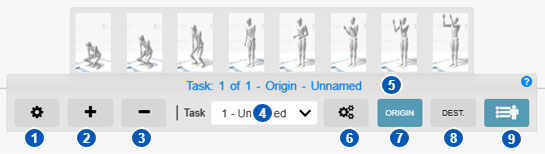
| No. | Control or area | Function |
|---|---|---|
| 1 | General lifting settings | Opens the global settings for the lifting assessment. |
| 2 | Add task | Adds a lifting task to a multitask analysis. |
| 3 | Delete task | Deletes an existing lifting task. |
| 4 | Task selector | Selects the active task whose data will be entered or reviewed. |
| 5 | Active-task information | Displays the active task, its name, and whether the origin or destination is being viewed. |
| 6 | Task settings | Opens settings specific to the selected task. |
| 7 | Origin | Displays and defines the lifting origin posture. |
| 8 | Dest. | Displays and defines the lifting destination posture. |
| 9 | Preset postures | Expands the preset-posture panel for applying a posture to the model. |
Purpose of the bar
A lifting assessment requires one or more tasks, not only a model posture. Each task can have an origin, a destination, and task-specific parameters. The periods during which the tasks occur and the recovery between them are defined separately in the general settings.
The bar lets you:
- create lifting tasks;
- select the active task;
- configure general analysis parameters;
- configure each task’s specific parameters;
- switch between origin and destination postures;
- apply preset postures;
- prepare the data required for lifting results.
Single-task and multitask lifting
A single-task analysis assesses one lifting or handling condition.
A multitask analysis assesses several lifting tasks within one activity, required when the worker lifts under different heights, distances, positions, loads, or other conditions.
Each task has its own parameters but contributes to the same overall analysis.
General lifting settings
Button 1 opens General lifting settings for parameters applying to the complete assessment:
- temporal organization;
- lifting-period durations;
- number of periods and recovery between them;
- temporal summary and resulting assessment blocks;
- load constant;
- anthropometric adjustment.
Add a task
Button 2 adds a task. Add one whenever lifting conditions differ, such as:
- origin or destination;
- horizontal distance;
- handling height;
- load;
- frequency;
- asymmetry;
- coupling quality.
The task appears in the selector and can be configured independently.
Delete a task
Button 3 deletes an existing task and its associated data. Before deleting, verify the active task in selector 4.
Removing a task can change the overall multitask result.
Task selector
Control 4 selects the active task—the task whose data are being entered, displayed, or changed.
Changing it loads the selected task’s parameters and postures. This is essential in multitask analyses so that task data are not mixed.
Active-task information
Area 5 normally displays:
- active-task number;
- total number of tasks;
- task name;
- whether the origin or destination is displayed.
Check this information before changing a posture or parameter.
Task settings
Button 6 opens Task settings for the selected task.
They define load, frequency, coupling, significant control at the destination, and other task-specific parameters. See Lifting-task settings.
Lift origin
Origin, identified by number 7, displays and defines the initial posture of the body and load.
Correctly define:
- model posture;
- hand position;
- load location;
- initial height;
- horizontal distance;
- asymmetry;
- task-specific conditions.
The origin posture can be adjusted manually.
Lift destination
Dest., identified by number 8, displays and defines the final body and load posture.
Define model posture, load position, and relevant geometric conditions. Comparing origin and destination describes vertical travel, posture change, and other essential lifting characteristics.
Difference between origin and destination
The origin is the initial lifting situation; the destination is the final one.
When significant control at the destination is required, the task result considers both endpoints and is determined by the less favorable one. A low origin can be more demanding at the start, while controlled placement at a high destination can be more demanding at the end.
Without significant destination control, the task result is determined from the origin. Destination data and posture remain necessary to describe and review the movement but do not determine the task index.
Define both postures accurately and verify the significant-control setting.
Preset postures
Control 9 expands the preset-posture panel.
Presets quickly apply body configurations to the model while defining the origin or destination. They do not replace manual review. Adjust the posture as necessary using Manual manipulation of the model posture.
Relationship with lifting results
After temporal organization, tasks, origin and destination postures, and task-specific parameters have been defined, the system calculates lifting results.
See Load lifting for individual and combined task results, temporal assessment blocks, and the determining block or blocks.
Recommended procedure
- Select Lifting mode.
- Define temporal organization and common parameters under General settings.
- Add the required tasks.
- Select a task.
- Define its origin posture.
- Define its destination posture.
- Enter its task-specific settings.
- Repeat for each multitask task.
- Verify the active task and endpoint before interpreting results.
- Review the lifting results.
Precautions
- Verify that the correct task is being configured.
- Do not confuse origin and destination.
- Check that postures represent the real task.
- Review every task’s specific parameters.
- In multitask analyses, ensure that every task is configured.
- After deleting a task, review the overall analysis.
- Manually adjust preset postures when necessary.
Related manual sections
- Operating modes
- Manual manipulation of the model posture
- General lifting settings
- Lifting-task settings
- Load lifting
- Load or force at the hands
Relationship with the Technical foundations
For methodological details, see:
- Load-lifting analysis
- Definition of lifting tasks, general parameters, and anthropometric adjustment
- Origin and destination positions
- Analysis results: Recommended Weight Limit, Lifting Index, and Composite Lifting Index
These sections explain single-task and multitask lifting, task definition, general parameters, origin and destination characterization, and the main lifting results.