REBA: analysis settings
This dialog configures the options used by Ergoniza Intelligent for REBA postural assessment. Open it with the gear button at the bottom of Postural load: REBA.
The options define task conditions affecting the method result, including static postures, repetitive movements, significant postural changes, sudden impacts or loads, coupling quality, and conditions related to upper-arm support or favorable orientation relative to gravity.
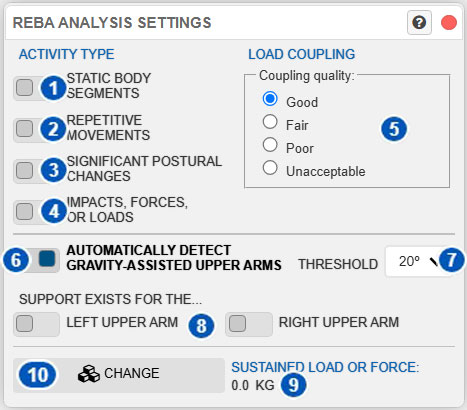
| No. | Control | Function |
|---|---|---|
| 1 | Static body segments | Indicates that one or more body segments remain static during the task. |
| 2 | Repetitive movements | Indicates that the task includes repetitive movements. |
| 3 | Significant postural changes | Indicates significant postural changes or unstable postures during the task. |
| 4 | Impacts, forces, or loads | Indicates sudden impacts or application of forces or loads. |
| 5 | Coupling quality | Specifies the quality of the load coupling. |
| 6 | Automatically detect gravity-assisted upper arms | Enables automatic detection of upper-arm postures considered favorable relative to gravity. |
| 7 | Threshold | Sets the maximum angle from vertical for automatically considering an upper arm gravity-assisted. |
| 8 | Left upper-arm / right upper-arm support | Indicates whether each upper arm is supported during the task. |
| 9 | Sustained load or force | Displays the sustained force or load currently used by the REBA analysis. |
| 10 | Change | Opens the load dialog to change the sustained force or load. |
Purpose of the dialog
REBA depends not only on posture geometry but also on task and load-interaction characteristics that can change its final score.
Use this dialog to define those conditions. Before interpreting the REBA result, verify that the options represent the actual assessed situation.
For an overview, see Postural load: REBA.
Activity type
The upper-left area defines task conditions affecting the final REBA result.
Static body segments
Control 1 indicates static body segments.
Enable it when one or more body segments remain static during the task. In the traditional method formulation, this includes segments sustained for an appreciable time, such as more than one minute.
In Ergoniza Intelligent, this condition increases the final REBA score. Enable it only when it represents the real task.
Repetitive movements
Control 2 indicates repetitive movements.
Enable it when the task contains frequently repeated movements. It represents the additional demand of a posture or gesture that occurs repeatedly rather than in isolation.
This condition increases the final REBA score.
Significant postural changes
Control 3 indicates significant postural changes during the task.
Use it when the task involves relevant postural changes or unstable postures rather than one stable posture. This also increases the final REBA score.
Impacts, forces, or loads
Control 4 indicates sudden impacts, forces, or loads.
It represents tasks in which force is not applied smoothly or steadily but suddenly or with impact. It increases the REBA force/load component.
Coupling quality
Control 5 specifies the load coupling quality:
- Good
- Fair
- Poor
- Unacceptable
Coupling quality affects REBA Group B. A poorer coupling produces a larger penalty and thus a higher final score.
Select the category that represents the real task. A firm, stable coupling is better; an insecure, awkward, or clearly deficient coupling requires a poorer category.
Automatic detection of gravity-assisted upper arms
Control 6 enables automatic detection of upper arms in a posture favorable relative to gravity.
This affects the REBA upper-arm score. When an upper arm is favorably oriented relative to gravity, Ergoniza Intelligent can reduce its penalty.
Operationally, when the system detects a favorable spatial orientation, the upper-arm score can be reduced by one point, similarly to an upper arm that is supported.
How detection works
The system compares upper-arm orientation with vertical. If the upper arm is sufficiently close to downward vertical, its posture is considered gravity-assisted.
The angular threshold in control 7 determines this.
Relationship with manual support controls
When automatic detection is enabled, the upper-arm support controls represent actual supports only.
When it is disabled, those controls can be used more broadly to indicate that an upper arm is supported or should manually be treated as favorably oriented relative to gravity.
Therefore:
- with automatic detection enabled, favorable orientation is recognized automatically and controls 8 indicate actual support;
- with automatic detection disabled, the user manually indicates support or favorable orientation.
Automatic-detection threshold
Control 7 defines the maximum angle between the upper arm and vertical for automatic gravity-assisted classification.
With a threshold of 20°, for example, an upper arm is considered gravity-assisted when it lies within that angular margin from vertical.
- A lower threshold is stricter and accepts only postures very close to vertical.
- A higher threshold is more permissive and accepts postures farther from vertical.
Keep a moderate value unless there is a clear reason to change it.
Left and right upper-arm support
Controls 8 indicate left upper-arm support or right upper-arm support during the task.
Support can favorably affect the corresponding REBA upper-arm score by reducing postural demand.
When automatic gravity-assisted detection is enabled, use these controls only for actual supports. When it is disabled, they can also indicate that the upper arm should be treated as supported or favorably oriented.
Use them only when they accurately represent the task.
Sustained load or force
Area 9 displays the sustained load or force considered by REBA.
This load is defined in the general load-entry system rather than in this dialog. The displayed value is the load active in the assessed posture or activity.
To enter or review it, see:
For other body loads, also see:
Sustained load directly affects the REBA force/load score.
Change button
Change, identified by number 10, opens the load dialog.
It provides quick access to load settings without leaving the REBA context. After changing the load, review the REBA result because its risk level can change.
Effect of the options on REBA
In Ergoniza Intelligent:
- Static body segments, Repetitive movements, and Significant postural changes increase the final score.
- Impacts, forces, or loads increase the force/load component.
- Coupling quality changes Group B.
- Upper-arm supports or gravity-assisted postures can reduce the corresponding upper-arm penalty.
- Sustained load or force changes the load component.
The same geometric posture can therefore produce different results when these conditions change.
Recommendations for use
Before interpreting REBA:
- Enable Static body segments for prolonged posture sustainment.
- Enable Repetitive movements for frequently repeated movement.
- Enable Significant postural changes for relevant changes or instability.
- Enable Impacts, forces, or loads when force is not applied smoothly.
- Select a realistic Coupling quality.
- Enable automatic detection when the system should identify gravity-assisted upper arms.
- Review the Threshold if detection is too strict or permissive.
- Identify actual supports for each upper arm.
- Verify that the Sustained load or force matches the task.
Related manual sections
Relationship with the Technical foundations
For methodological details, see:
- Risk assessment of adopted postures using REBA and LUBA
- Postural-risk assessment using REBA
- Upper-limb orientation relative to gravity
- Conceptual differences between single-posture and multiple-posture analysis
These sections explain the REBA method, the role of load, coupling, activity conditions, support, and favorable orientation relative to gravity.