Lifting task settings
The Task Settings window defines the parameters of a specific lifting task. These parameters apply only to the task selected on the Load-lifting task bar.
Open this window with the task-settings button on the Lifting mode task bar.
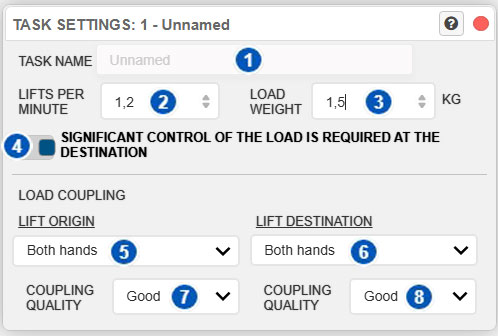
| No. | Control | Function |
|---|---|---|
| 1 | Task name | Assigns a descriptive name to the selected lifting task. |
| 2 | Lifts per minute | Sets the frequency of the lifting task. |
| 3 | Load weight | Sets the weight of the handled load in kilograms. |
| 4 | Significant control at destination | Indicates whether the worker must regrip, hold, accurately place, or guide the load at the destination. |
| 5 | Hand used at origin | Indicates whether the load is handled at the origin with both hands, the right hand, or the left hand. |
| 6 | Hand used at destination | Indicates whether the load is handled at the destination with both hands, the right hand, or the left hand. |
| 7 | Coupling quality at origin | Defines the quality of the load coupling at the lift origin. |
| 8 | Coupling quality at destination | Defines the quality of the load coupling at the lift destination. |
Purpose of the window
Lifting mode analyzes manual load-handling tasks. When an analysis includes multiple tasks, each task may have different conditions. This window enters data for the selected task without changing the other defined tasks.
These settings affect the lifting calculation, particularly frequency, actual load weight, coupling, and whether significant control is required at the destination.
Before changing a value, verify on the task bar that the correct task is selected.
Task name
Control 1 sets the task name.
A descriptive name identifies each task in a multitask analysis. It may identify the location, phase, or lifting condition, for example:
- “Lift from floor”;
- “Place on shelf”;
- “Initial lift”;
- “Task 1: low box”;
- “Task 2: high box.”
Clear names make later review easier and reduce the risk of editing the wrong task.
Lifting frequency
Control 2 defines the lifting frequency in lifts per minute.
Frequency is the number of times that specific task is performed in one minute. It is essential to the analysis because the same load has different implications when lifted once occasionally or repeatedly over an extended period.
Decimal values are accepted. For example, a task performed 7 times in 10 minutes has an average frequency of 0.7 lifts per minute. When the entered frequency falls between two NIOSH table values, Ergoniza Intelligent obtains the Frequency Multiplier by linear interpolation.
In a multitask analysis, each task can have its own frequency. Enter the frequency of the selected task, not the total frequency of the entire activity.
Interpreting frequency
Lifting frequency contributes to exposure assessment. Higher frequency can increase task demands, particularly when the activity continues for a prolonged period.
Estimate frequency from the actual task. If repetitions are irregular, use a value that is representative of the analyzed period.
Load weight
Control 3 sets the weight of the handled load in kilograms.
This is the actual load lifted or moved in the selected task. It is one of the main analysis parameters and is compared with the Recommended Weight Limit calculated by the system.
Decimal values are accepted, allowing loads such as 12.5 kg to be represented accurately.
Enter the weight handled by the worker in that specific task. If tasks use different loads, define them separately or configure each one individually in the multitask analysis.
Precautions when entering weight
The weight must represent the load actually handled. Before interpreting the results, verify that:
- the value is in kilograms;
- it belongs to the selected task;
- the weight of the container, tool, or handled item has not been omitted;
- each task has the appropriate value if weight varies among tasks.
Significant control at destination
Control 4 indicates whether there is significant control of the load at the destination.
Keep this control enabled when the worker must perform an action at the destination that requires relevant load control, such as:
- regripping it;
- holding it suspended or stabilized;
- placing it accurately;
- guiding or carefully positioning it.
When this control is enabled, Ergoniza Intelligent calculates the lifting conditions at both the origin and destination and uses the less favorable result for the task.
Disable the control only when there is no significant load control at the destination. The task result is then determined from the origin conditions, although destination data and posture remain part of the movement description.
This setting is stored independently for each task. In a multitask analysis, some tasks may require significant control at the destination while others do not.
Load coupling
The lower part of the window defines the load coupling conditions at the origin and destination.
Coupling quality affects how easily the worker can handle the load. Good coupling reduces task demands, while poor coupling may increase risk and reduce the Recommended Weight Limit.
Define two aspects:
- which hand or hands perform the handling;
- the coupling quality.
Enter these values independently for the origin and destination because conditions may change between them.
Hand used at origin
Control 5 indicates how the load is handled at the lift origin.
The available options are:
- both hands;
- right hand;
- left hand.
This information is relevant because one-handed handling may affect task interpretation, exertion distribution, and lifting symmetry.
Select the option that represents the actual condition at the start of the lift.
Hand used at destination
Control 6 indicates how the load is handled at the lift destination.
As at the origin, the load may be placed or handled with:
- both hands;
- right hand;
- left hand.
The worker may begin with one coupling condition and finish with another. For example, the worker may lift with both hands and end the movement by supporting or guiding the load mainly with one hand.
Coupling quality at origin
Control 7 defines the coupling quality at the lift origin.
The usual options are:
- Good;
- Fair;
- Poor.
Good coupling means that the load can be held securely and comfortably with effective control. Fair coupling represents acceptable but less-than-optimal conditions. Poor coupling means that the load is difficult to grasp, lacks suitable handles, requires unfavorable hand postures, or reduces control during handling.
Coupling quality at destination
Control 8 defines the coupling quality at the lift destination.
Select the option that best represents how the worker controls the load at the end of the movement.
Destination coupling may differ from origin coupling. A load may be picked up where access is good but deposited where manual control is poorer, or vice versa.
Describe both conditions accurately. However, destination coupling and the other destination conditions can determine the task result only when Significant control of the load at destination is enabled. If it is disabled, the result is determined from the origin.
Difference between origin and destination
A lifting analysis characterizes both the origin and destination because conditions may differ at each point. Whether each endpoint contributes to the result depends on significant control at the destination.
Critical origin conditions may include:
- initial load height;
- horizontal distance from the body;
- trunk flexion;
- initial coupling quality;
- use of one or both hands.
When significant control is required, critical destination conditions may include:
- final height;
- arm elevation;
- need to guide the load;
- asymmetry;
- coupling during placement.
When significant destination control is enabled, Ergoniza Intelligent compares both endpoints and uses the less favorable result. When it is disabled, the task result is determined from the origin; destination conditions remain available to describe and review the movement but do not determine the task index.
Do not assume that origin and destination conditions are the same. Review and configure them separately even when they do not contribute to the calculation in the same way.
Relationship to origin and destination postures
This window defines task data, while the model posture at the origin and destination is set from the lifting task bar with the Origin and Dest. buttons.
After configuring this window, verify that both postures accurately represent the actual situation. See:
Relationship to lifting results
The parameters in this window affect the lifting-analysis results, including:
- Recommended Weight Limit;
- Lifting Index;
- interpretation of the individual task;
- contribution of each task to a multitask analysis;
- overall handling assessment.
See Load lifting for the results window.
Recommendations for use
To configure a lifting task correctly:
- Select the correct task on the task bar.
- Assign a descriptive task name.
- Enter the lifting frequency per minute.
- Enter the actual weight of the handled load.
- Indicate whether significant load control is required at the destination.
- Specify whether the load is handled at the origin with both hands, the right hand, or the left hand.
- Specify whether the load is handled at the destination with both hands, the right hand, or the left hand.
- Select coupling quality at the origin.
- Select coupling quality at the destination.
- Review the origin and destination postures.
- Check the analysis results.
Precautions
Before interpreting the results:
- make sure you are editing the correct task;
- do not use the total activity frequency when configuring a specific task in a multitask analysis;
- verify that the load weight belongs to that task;
- enable significant destination control whenever the load must be regripped, held, accurately placed, or guided at the end of the lift;
- do not assume that coupling is identical at the origin and destination;
- select the applicable option for one-handed lifting;
- review the origin and destination postures after entering the parameters;
- update and review the results again after changing these values.
Related User Manual sections
Also see:
- Operating modes
- Load-lifting task bar
- General lifting settings
- Load lifting
- Manual manipulation of the model posture
- Model settings
Relationship to the Technical foundations
For a more detailed explanation of Lifting mode, see Section 13 of the Technical foundations, particularly:
- Load-lifting analysis
- Definition of lifting tasks, general parameters, and anthropometric adjustment
- Origin and destination positions
- Analysis results: Recommended Weight Limit, Lifting Index, and Composite Lifting Index
These sections explain how lifting tasks are defined, how frequency, load, and coupling are interpreted, how the origin and destination are characterized, and how the main analysis results are obtained.