Activity repetitions
The Activity Repetitions window defines the temporal interpretation of an activity in Multiple Postures mode. Open it with Times on the left menu when the evaluation represents an activity as a time sequence rather than a single posture.
Unlike Action Duration and Repetitiveness, which applies to a single-posture analysis, this window acts on an activity that has already been defined. It specifies whether the displayed activity is a single cycle or part of a series of repetitions and how rest periods between repetitions are modeled.
These parameters affect time-dependent results: cumulative postural load, cumulative postural discomfort, cumulative exertion load, and—when selected in the biomechanical settings—the evolution of recommended capacity. Configure them to match the actual task.
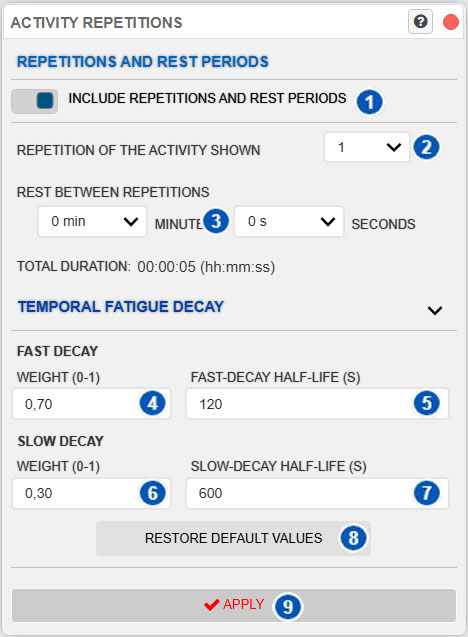
| No. | Control | Function |
|---|---|---|
| 1 | Consider repetitions and rest periods | Turns projection of the sequence into successive repetitions and their intervening rest periods on or off. It also determines whether cumulative exertion load and the evolution of recommended capacity can be calculated. |
| 2 | Displayed activity repetition | Selects the repetition of the activity to display and analyze. |
| 3 | Rest between repetitions | Sets the rest time between successive activity repetitions. |
| 4 | Fast-decay weight | Sets the relative contribution of the fast component to the reduction of cumulative effects during periods without new exposure. |
| 5 | Fast-decay half-life | Sets the half-life of the fast decay component in seconds. |
| 6 | Slow-decay weight | Sets the relative contribution of the slow component to the reduction of cumulative effects during periods without new exposure. |
| 7 | Slow-decay half-life | Sets the half-life of the slow decay component in seconds. |
| 8 | Restore defaults | Restores the recommended temporal-decay parameter values. |
| 9 | Apply | Applies the repetition, rest, and temporal-decay configuration to the assessed activity. |
Scope
This window is used only in Multiple Postures mode, where the activity shown on the timeline represents a cycle or posture sequence.
The repetition settings specify that this activity repeats without requiring every repetition to be physically duplicated on the timeline. The system uses the displayed activity as the base cycle and calculates cumulative effects from the selected repetition number and rest between repetitions.
This configuration affects the temporal interpretation of the activity and is an analysis parameter, not merely a display control.
Consider repetitions and rest periods
Consider repetitions and rest periods determines whether the displayed sequence is analyzed as a repeating cycle and whether rest between repetitions is included.
When enabled, the system uses the selected repetition, rest between cycles, and temporal configuration to calculate:
- cumulative postural load and discomfort;
- cumulative biomechanical exertion load;
- and, if Include cumulative exertion load in recommended exertion (%) is also enabled under Biomechanical analysis settings, the reduction and recovery of recommended capacity.
These results use different procedures. The numeric cumulative exertion-load value is not used directly to reduce recommended capacity.
When disabled, the activity is analyzed only as the displayed base sequence. Previous repetitions and intercycle rest are not included. Temporal controls are disabled, cumulative exertion load and its chart are unavailable, and recommended capacity is not updated from previous activity.
Do not confuse this control with Time-dependent in the Discomfort options. Discomfort can still depend on the duration of postures within the base sequence even when successive repetitions are not projected.
Displayed activity repetition
Control 2 selects the displayed activity repetition.
A value of 1 means that the first performance of the activity is being analyzed. A higher value means that the activity has already repeated and the displayed posture or sequence belongs to a later repetition.
This matters because some results depend not only on instantaneous posture but also on exposure history. Repeated activity can produce a higher cumulative load than a single performance.
If previous exertion is included in recommended capacity, the selected repetition also estimates the capacity available when that cycle is reached. The same posture may therefore show a different percentage in the first and later repetitions.
Use this control when the timeline sequence is a cycle repeated during the actual task. For example, if the animation shows a five-second work cycle that repeats many times, this control analyzes a later cumulative state without duplicating the cycle on the timeline.
Rest between repetitions
Control 3 defines the rest between repetitions in minutes and seconds.
This is the interval between the end of one activity repetition and the start of the next. During this interval, the system assumes that exposure to the displayed cycle is absent and applies the applicable temporal decay.
Rest periods model partial recovery between cycles. Two activities with identical postures and durations can produce different cumulative effects if one repeats continuously and the other includes pauses.
Rest may have two separate effects: reducing cumulative results and allowing partial recovery of recommended capacity. Both use the rest duration but are calculated independently.
Use zero or very little rest for continuous repetition. When a real pause exists between cycles, enter its approximate duration.
For the first repetition, intercycle rest has no practical effect because there are no previous repetitions. In later repetitions, it contributes to the cumulative state before the displayed cycle.
Total duration
The window also shows the activity’s total duration, calculated from the animation duration, selected repetition number, and rest between repetitions.
Use this value to check whether the temporal configuration is reasonable. If the total does not represent the actual task, review the repetition number or rest period.
The system may limit the maximum total duration for operational safety. If a configuration is too long, reduce the repetition number, rest, or animation duration.
Total duration contributes to cumulative calculations only when Consider repetitions and rest periods is enabled. Otherwise, the system analyzes only the displayed base sequence.
Temporal fatigue decay
The Temporal Fatigue Decay section configures how certain cumulative results decrease when exposure stops or rest is introduced.
This behavior uses a fast decay component and a slow component. The fast component allows part of the cumulative effect to decrease rapidly, while the slow component represents a more persistent part.
These weights and half-lives apply to memory-based cumulative calculations. They are not the parameters used to estimate recovery of recommended joint capacity, which uses a separate procedure and cannot be configured in this window.
Keep the default values unless a clear methodological basis supports a change.
Fast-decay weight
Control 4 sets the fast-component weight between 0 and 1.
It is the proportion of the cumulative effect associated with the component that decays more rapidly. A higher fast weight allows more of the effect to decrease with a short half-life; a lower value shifts more weight to the slow component.
Retain the default under normal conditions unless there is a methodological reason to change it.
Fast-decay half-life
Control 5 sets the fast-component half-life in seconds.
The half-life is the time required for this component to fall to approximately half its value when there is no new exposure. A low value produces rapid decay; a higher value makes the component persist longer.
Changing it alters how the system interprets short rests and pauses between repetitions.
Slow-decay weight
Control 6 sets the slow-component weight between 0 and 1.
It is the proportion of the cumulative effect associated with the slower-decaying component. A higher slow weight makes more of the effect persist and can increase the relevance of previous exposure when repetitions or rests are insufficient.
Interpret the fast and slow weights together. As a general rule, their sum should equal 1. If you change them manually, verify that the combination is consistent.
Slow-decay half-life
Control 7 sets the slow-component half-life in seconds.
A high value causes the cumulative effect to persist longer even when pauses or rests occur between repetitions.
Change this parameter carefully because it directly affects interpretation of cumulative exposure in repeated tasks.
Restore defaults
Button 8 restores the default weights and half-lives for the fast and slow temporal-decay components.
Use it when entered values are uncertain or to restore the standard configuration before comparing results.
Apply
Button 9 applies the configuration.
Before Apply is selected, changes remain pending. Applying them invalidates previous temporal results and recalculates cumulative postural load, discomfort, cumulative exertion load, and, when applicable, the evolution of recommended capacity.
Charts, Results Advisor, Ergo-Wizard, and reports that depend on the sequence may change after recalculation.
Effect on results
When Consider repetitions and rest periods is enabled, the system projects the base cycle through the selected repetition and inserts the specified rest periods.
Short rests may allow more of the effects of previous repetitions to remain. Longer rests allow cumulative results to decrease and, when recommended capacity is being updated, allow partial recovery.
Fast and slow decay parameters affect memory-based cumulative results but do not directly control recovery of recommended capacity.
When the option is disabled, the system does not project successive repetitions. Cumulative exertion load and its chart are unavailable, and recommended capacity is not updated from earlier cycles. Instantaneous results for postures in the base sequence remain available.
Recommendations for use
Configure the base animation or activity first, then use this window to describe how it repeats in the actual task.
As a general procedure:
- Use Displayed activity repetition to select the cycle to represent.
- Enter Rest between repetitions only when a real pause exists.
- Review Total duration to verify that the configuration is reasonable.
- Retain default temporal-decay values unless you have a clear basis for changing them.
- Select Apply to recalculate time-dependent results.
Do not use this window to correct an incorrectly defined animation. First revise the posture sequence and duration, then configure repetitions and rest.
To analyze only the displayed activity without extrapolating successive repetitions, disable Consider repetitions and rest periods and select Apply. This is useful when the captured sequence already represents the intended exposure period or reliable repetition/rest information is unavailable.
For previous exertion and rest to change recommended capacity, both Consider repetitions and rest periods and Include cumulative exertion load in recommended exertion (%) must be enabled.
Relationship to the Technical foundations
For the mathematical basis, see:
- Cumulative exertion load in multiple-posture analysis
- Cumulative exertion-load concept
- Temporal integration of dose and cumulative-load update
- Partial recovery between exertions
- Repeated tasks and rest between repetitions
- Conceptual differences between single- and multiple-posture analysis
- 3CC-r model and Recommended Moment in multiple-posture analysis
- Limitations of multiple-posture analysis, the 3CC-r model, and cumulative exertion load
These sections explain how exposure, rest, repetition, and recovery affect postural load, discomfort, cumulative exertion load, and recommended capacity, and clarify the differences among these results.